
Image: Wired
Discover Skylight's Calendar 2, a digital organizer that's changing family communication. Explore its features and why it matters for your home.
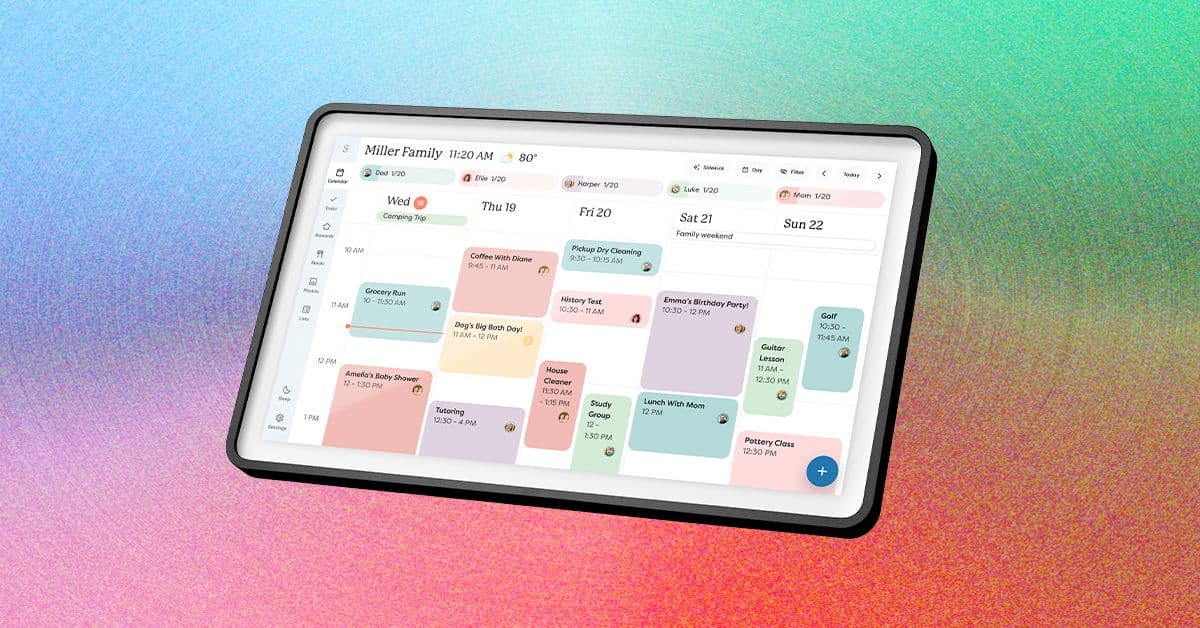
GlipzoIn an age where digital tools dominate our daily lives, finding the perfect organizational tool can often feel overwhelming. For many couples and families, keeping track of schedules, meal plans, and important reminders requires more than just a smartphone. Enter the Skylight Calendar 2, a device that aims to bridge the gap between digital convenience and physical presence. Launched recently, this 15-inch digital calendar is designed to sit on a countertop or hang on a wall, providing a centralized hub for family planning.
The Skylight Calendar 2 stands out in a crowded market of digital planners, boasting an array of features that promise to streamline daily life. This latest addition to Skylight's lineup not only enhances the user experience with its larger screen but also promises faster performance compared to its predecessors. With the ability to connect seamlessly to Wi-Fi, it enables users to integrate their existing calendars—whether Google Calendar, Apple Calendar, or others—into one cohesive interface.
The device also introduces interchangeable snap frames, allowing users to customize the look of the calendar to fit their home decor, reminiscent of the Skylight Frame 2 digital picture frame. This unique feature is a welcome addition for those looking to blend technology with home aesthetics.
As families navigate their busy lives, the need for effective communication and organization becomes paramount. The Skylight Calendar 2 addresses this need, especially for families who want to reduce screen time during meals and family time. By providing a physical calendar that displays essential information at a glance, families can engage more meaningfully during shared moments.
However, the success of this device largely hinges on the commitment of all family members. Without universal buy-in, the device’s potential goes largely unutilized. Thankfully, with a price point significantly lower than its larger counterpart, the Calendar Max, the Calendar 2 offers a more accessible entry point for families looking to enhance their organization.
Once set up, users will find that the Skylight Calendar 2 displays their primary calendar by default, which can easily include multiple synced calendars. This capability allows for the integration of various schedules—personal, work, and even birthdays—effortlessly, eliminating the need for constant phone checks.
Beyond calendar features, the device also offers several tabs that include: - Lists: For creating to-do lists and reminders. - Tasks: To keep track of ongoing responsibilities. - Rewards: A gamified feature that encourages task completion. - Meals and Recipes: Planning meals and storing favorite recipes. - Photos: Displaying cherished memories. - Sleep: Settings related to device notifications and nighttime use. - Settings: General device management options.
However, while these features promise a lot, many are locked behind a Plus Plan subscription which costs $79 per year or $8 per month. This might deter some users who are not ready to invest further.
One of the standout features of the Calendar 2 is its Meals tab, which allows users to plan weekly dinners and grocery lists. Users can manually input their favorite recipes into the Recipes tab, making it easier to add them to the meal plan and subsequently generate a grocery list based on chosen meals. This process, while somewhat clunky, is straightforward and provides a new way to organize meals visually.
The Calendar 2 encourages creativity in meal planning—users can type in fun names for their meals, making the process enjoyable. However, the device does not memorize quick meals unless they are saved under the Recipes section, which may require users to adjust their workflow.
The Skylight Calendar 2 has been designed with families in mind. Its visual layout is user-friendly, making it easy for everyone in the family to interact with. The option to use the companion Skylight app adds another layer of convenience, allowing users to manage their calendars remotely. However, some features may require extra effort to become truly beneficial, especially those reliant on the subscription model.
As families continue to look for innovative ways to stay organized in a fast-paced world, products like the Skylight Calendar 2 represent a significant shift towards integrating technology into daily family life. The challenge for Skylight will be ensuring that their device remains relevant and user-friendly, especially as competitors enter the market.
Moving forward, users should watch for updates and potential expansions in features that could make the Plus Plan more enticing. Additionally, the feedback from early adopters will likely influence future iterations of the product, as Skylight continues to refine its offerings.
In conclusion, the Skylight Calendar 2 provides a compelling option for families aiming to enhance their organizational capabilities. With its blend of digital functionality and physical presence, it promises to help families engage more fully with each other, turning planning into a shared experience rather than a solitary task.

Nvidia's new RTX Spark chip aims to transform personal computing with AI, marking a significant shift in technology. Discover what this means for consumers.
BBC Business
The explosion of Blue Origin's New Glenn rocket raises significant concerns over NASA's lunar ambitions and the future of Amazon's satellite projects. Discover the implications.
BBC Science
Discover how Meta's lack of engagement on user bans raises critical concerns about accountability and transparency in social media governance.
BBC Technology